Table of Contents
- AES Software Suite
- Overview
- Households Replace Associations
- Enhanced Group Management
- Host Control Over Guest Information
- Automated Guest Invites (RSVPs)
- Flexible Bidder Numbers in Households
- Improved Grid Controls
- Household-Enabled Check-In
- Bid Paddle Printing Options
- Updated Reporting
- API Updates
- Automated Household Charging
- Data Tools Updates
- Data Quality Enhancements
- Additional Changes
- Bug Fixes
AES Suite 12.0
Version 12.0 brings automation, improved data quality, and streamlined workflows. New Household system replaces associations, with enhanced management, check-in, and automated invites.

Table of Contents
- AES Software Suite
- Overview
- Households Replace Associations
- Enhanced Group Management
- Host Control Over Guest Information
- Automated Guest Invites (RSVPs)
- Flexible Bidder Numbers in Households
- Improved Grid Controls
- Household-Enabled Check-In
- Bid Paddle Printing Options
- Updated Reporting
- API Updates
- Automated Household Charging
- Data Tools Updates
- Data Quality Enhancements
- Additional Changes
- Bug Fixes
- AES Software Suite
- Overview
- Households Replace Associations
- Enhanced Group Management
- Host Control Over Guest Information
- Automated Guest Invites (RSVPs)
- Flexible Bidder Numbers in Households
- Improved Grid Controls
- Household-Enabled Check-In
- Bid Paddle Printing Options
- Updated Reporting
- API Updates
- Automated Household Charging
- Data Tools Updates
- Data Quality Enhancements
- Additional Changes
- Bug Fixes
AES Software Suite
Version 12.0
Release Date: March 30, 2026
Overview
AES Software Suite 12.0 delivers major improvements to how you manage contributors, events, and data collection. This release focuses on automation, better data quality, and streamlined workflows.
- Enhanced data management with improved viewing, organizing, and export capabilities
- Automated ticket distribution for table hosts via email and text
- Customizable reminder system with recurring ticketing notifications
- Streamlined household and group management
Households Replace Associations
The new Household system replaces the previous bidder number association method. This change improves both contributor and administrator experiences by providing better control over shared accounts, purchases, bids, and payments.
ARTICLE: Contributor Households
Enhanced Group Management
Group management now offers greater visibility and administrative control. While groups serve various purposes like organizing fundraising teams, the primary use case remains managing event attendees when hosts purchase multiple tickets for guests.
Host Control Over Guest Information
Hosts now have more flexibility in when they can edit guest names and send ticket invitations, giving you better control over the ticketing process.
ARTICLE: Allowing Hosts to Update Guest Names Later
Automated Guest Invites (RSVPs)
The new automated ticket assignment and RSVP system sends immediate and recurring notifications to guests. This encourages guests to accept tickets and complete profiles before arrival, improving data quality and reducing check-in workload.
ARTICLE: Guest Invites (RSVPs)
Flexible Bidder Numbers in Households
Household members can now either share the same bidder number or have individual numbers. This flexibility supports various use cases, particularly when pre-printing bidder paddles.
ARTICLE: Bidder Numbers Within Households
Improved Grid Controls
All grid controls have been enhanced to provide better data viewing, organization, and export capabilities.
Household-Enabled Check-In
Express Check-In
Express check-in now supports the new Household system for faster self-service.
ARTICLE: Express Check-In for Households
Staffed Check-In
The Event Manager check-in screen has been redesigned to allow staff to check in entire households simultaneously.
ARTICLE: Staffed Check-In for Households
Bid Paddle Printing Options
Choose from two printing approaches based on your event needs:
- One paddle per person – Best for paddle drops or when collecting paddles after live auctions
- One paddle per bidder number – Efficient for shared bidding when households have the same bidder number and table
ARTICLE: Bid Paddle Printing for Households
Updated Reporting
Custom Report Generator
Multiple reporting entities now support the new household and group structure.
Updated entities: Contributors, Bids, Sales, Donations, Payments
Changes:
- Removed association-related columns
- Added household columns: Household Name, Is Billing (T/F)
- Added group columns: Group Name, Is Host (T/F)
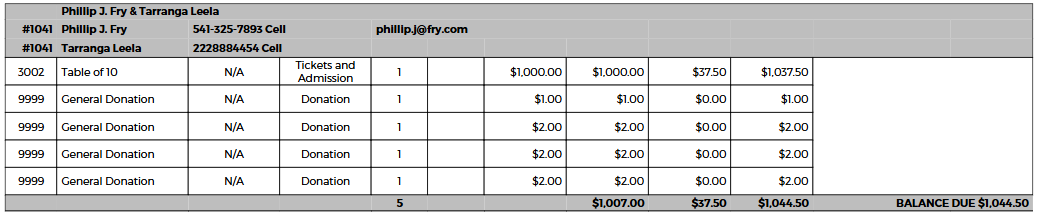
Invoice Summary
Invoice summaries now reflect household structure. Each household generates one section containing contact information for all members.
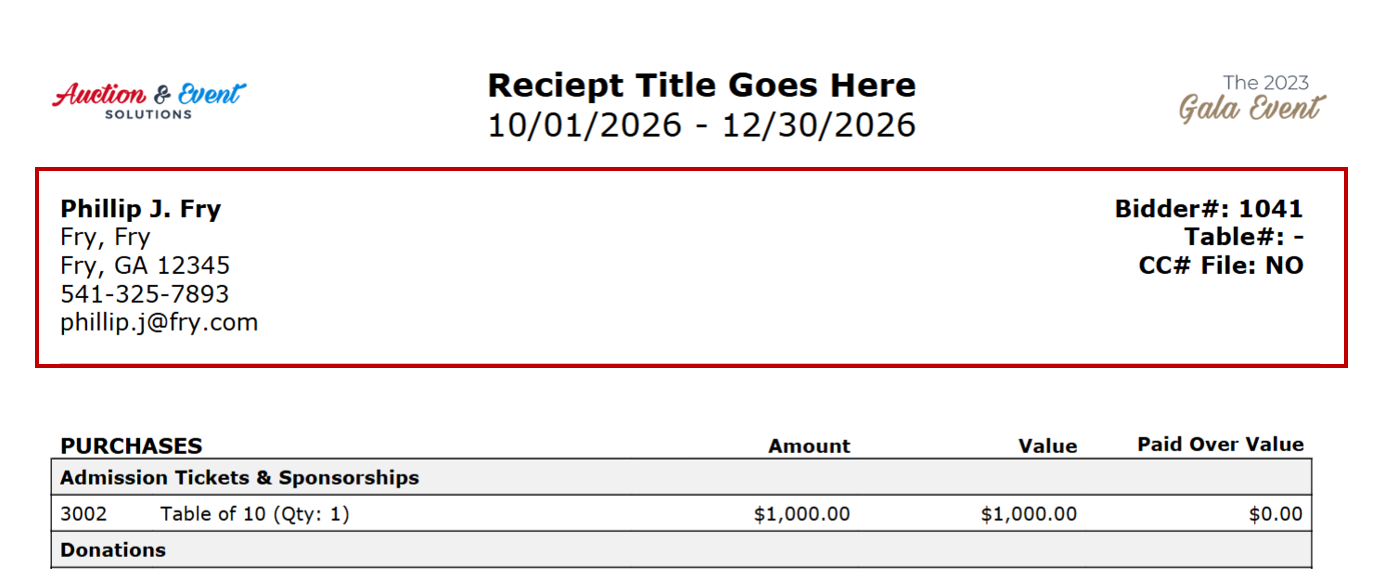
Receipts
Each household receives one consolidated receipt showing the billing contact's information in the header and all household purchases and payments.
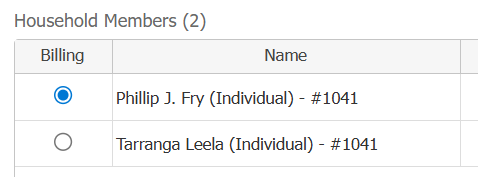
To change the billing contact:
- Option 1: Auction Conductor > Contributors > Open household > Edit billing contact > Save
- Option 2: Event Manager > Check-Out > Open checkout details > Click "Switch Billing"
API Updates
Several API changes support the new household system.
Affected Endpoints
- getContributors: Returns all contributors for an event
- getActivity: Provides contributor activity including sales and payment data
- Webhooks: Sends data when users complete ticketing checkout
Response Changes
Removed: primary_contributor_id
Added:
- group_id: Group identifier (nullable)
- household_name: Household text identifier (nullable)
- household_id: Household numerical identifier (nullable)
- is_billing: Boolean for billing contact status (nullable, returns "true" if no household assigned)
"group": "Smith, John",
"group_id": 67,
"is_host": true,
"household": "The Smith Family",
"household_id": 37,
"is_billing": true
Automated Household Charging
Automatically charge credit cards for contributors with unpaid balances after your event ends. This feature is especially useful for early departures or unused self-checkout links.
Access this feature: Payments tab > Apply to Accounts

Card Selection Process
The system selects one card per individual contributor or one per household.
Selection priority:
- Billing contact's card (first priority)
- Most recently used card from other household members
- Preferred cards always take priority over other saved cards
Data Tools Updates
Some data tools (Setup > Data Tools) are affected by household and group changes.
- Copying Contributors: Contributors copy without groups, households, contributor types, or affiliations since these are event-specific
Data Quality Enhancements
- Credit card attribution: Sales correctly attribute to card owners at checkout, eliminating sync conflicts
- Complete billing addresses: Self-checkout now requires full billing addresses for all payments
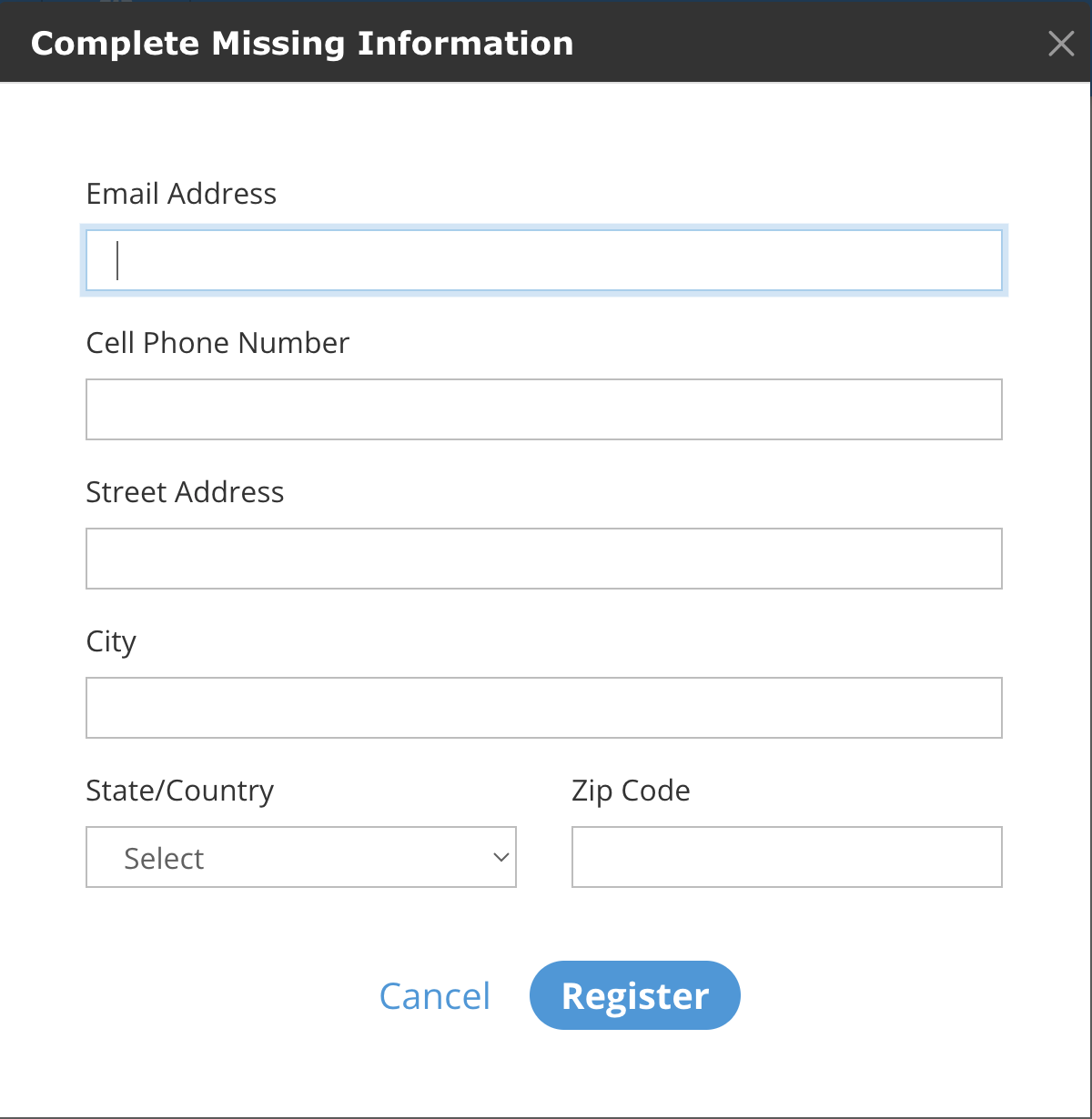
In the mobile bidding app, checkout verifies contact information completeness based on your "data required to complete registration" settings.
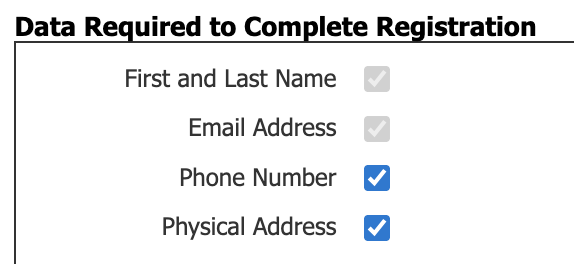
Users must complete missing required fields before proceeding to checkout.
Additional Changes
- "Reassign Bidder Numbers" moved from Contributors screen to Setup > Data Tools in Auction Conductor
Bug Fixes
- Fixed mobile bidding app bug that showed unpublished packages in search results
How did we do?
AES Suite 11.6
Clearing Your Browser Cache
