Verbal Paddle Raiser/Fund-a-Need
Best practices. Link to generic scribe template until we have a PDF report. Quick Entry. VERBAL CASH CALL 1.) What Is It? ● A verbal cash call (also known as a ‘paddle-raiser,’ or ‘fund-a-need’) is a…

- Best practices
- Link to generic scribe template until we have a PDF report
- Quick Entry
VERBAL CASH CALL
1.) What Is It?
● A verbal cash call (also known as a ‘paddle-raiser,’ or ‘fund-a-need’) is a fundraising method during which donors are asked to give at various monetary levels. In many cases, a verbal cash call will happen right before, in between or directly after the live auction.
2.) How Does It Work?
● A cash call begins with the auctioneer detailing the HOW and the WHY: How the money for the paddle raise will be used and why guests should be donating. He or she will then start by asking for the highest amount (this can be $2,500 or as much as $10,000, depending on the event and the guests attending) and will then work their way down into smaller amounts (usually ending with $100).
3.) Paddle Raise: Best Practices
● Have A Variety of Donor Levels. Prior to the event, determine how many different donor levels you want to offer and how much each level will be worth.
○ Highest Level: Start by setting your highest level. How high you decide will be entirely dependent on the event and the guests attending. Some organizations strive for an ambitious $20,000 while others begin with $10,000, and so on. You want to set the level as high as possible while still allowing it to be attainable for at least one donor.
○ Lowest Level: Next, set your lowest donation level. This should be a number that is attainable for nearly all of your donors. In many cases, $100 is a good low level donation.
○ In-Between: Lastly, fill in the donation levels between your highest and your lowest levels. Try to space them out as evenly as possible. You should aim to have at least 6 donation levels total.
● Start With the Highest Level: Always start with the highest donation level and work your way down. This will incentivise low-level givers to give more once higher spending guests have already donated at the higher levels.
● Turn Your Cash Call into a Fund-a-Need. While a paddle raise is a general term for the donation portion of the evening, a fund-a-need takes it to the next level by assigning each donor level to a specific, tangible need.
○ Example: If an organization is raising money for schools in low-income areas, the $200 level might represent a new computer for one student, or the $1,000 might mean that a whole classroom will receive a new smart tv for learning.
● Record Your Donations. Cash calls move pretty quickly so you’ll want to ensure that you’re recording the donations as the program moves along.
○ Scribe Sheets: Your AES planner will print scribe sheets for your volunteers and the AES team to record donations,
○ Data Entry: In addition to the scribe sheets, the AES team will record the data in real time through Event Manager. Doing so will allow you the option to project total raised and/or scrolling donor names on the big screen.
● Recognize Those Who Have Donated: While the purpose of a cash call is to receive donations, it doesn’t hurt to give a shout out to those who have participated in the donating process. Consider putting names on the big screen as our AES team enters real time data or giving out small, commemorative items.
Quick Entry
What is Quick Entry?
Quick Entry is an AES software feature that allows users to enter donations in real time, which is especially helpful during a Live Auction and/or Cash Call part of the program.
Donations entered through Quick Entry mode can be displayed on a Big Screen Report and can reflect total raised, scrolling donor names and more.
How to Use Quick Entry (Live Auction)
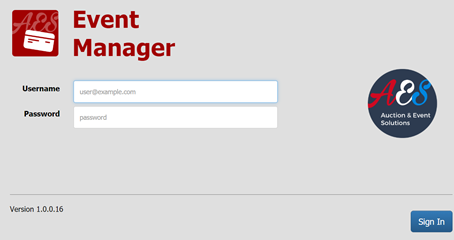
- Log in to Event Manager
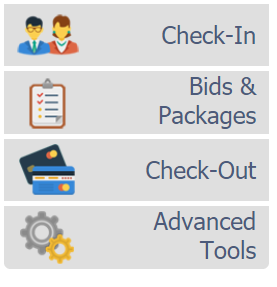
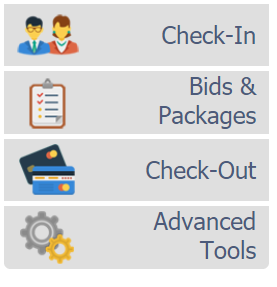
- Click the ‘Bids and Packages’ tab on the left
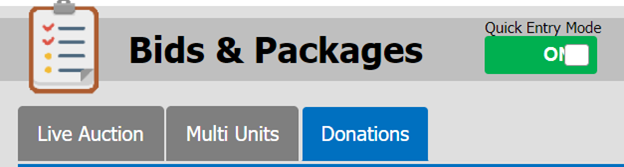
- Turn on the ‘Quick Entry Mode’ button at the top (it should turn green)
- Click on the ‘Live Auction’ tab
- From here you can view a list of all the live auction packages
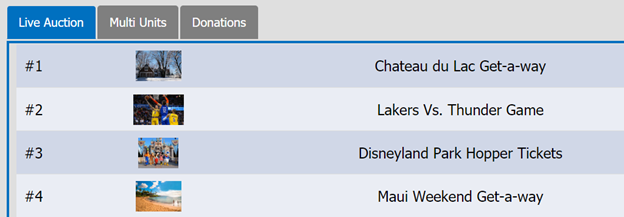
- Double-click on a package
- Enter the winning bid amount and bid number. Click on the blue ‘Save Bid’ button.
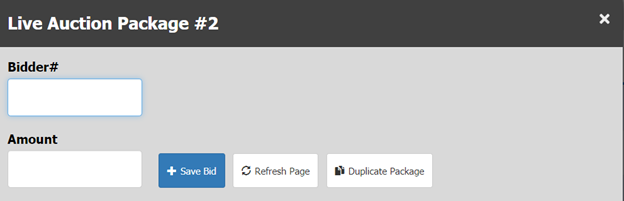
- If a package is going to be sold to more than one bidder, click the ‘Duplicate Package’ button. The new duplicated package will appear in the list of live auction packages.
How to Use Quick Entry (Donations)
- Log in to Event Manager
- Click the ‘Bids and Packages’ tab on the left.
- Turn on the ‘Quick Entry Mode’ button at the top (it should turn green)
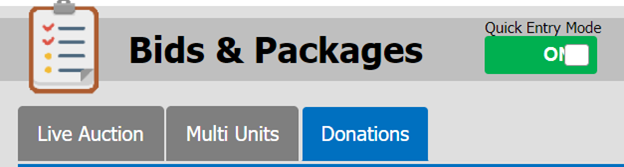
- Click on the donations tab
- Double click on ‘General Donation’

- Enter the donation amount
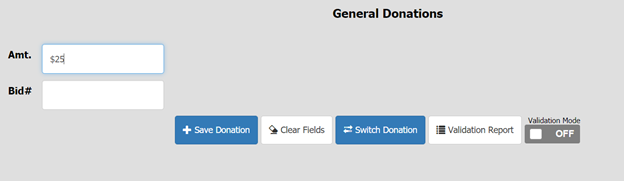
- Enter the bidder number
- To save the donation, either click ‘enter’ or the blue ‘Save Donation’ button
Best Practices
- Validation - The Validation Report is a software feature that allows users to verify Quick Entry donations. Here’s how to validate in Event Manager:
- On the Quick Entry donation page, toggle the Validation Mode button on the right side of the screen. You will see an orange ‘Switched to Bid Validation Mode’ message appear.

- Using scribe sheets collected from volunteers and/or AES staff, begin re-entering all Cash Call donations.
- If the donation is correctly validated, a ‘Validation Successful’ message will appear.
- If the donation is not validated successfully, a ‘Validation Error’ message will appear. This means that there was an error validating a specific donation and needs to be looked into. Consult additional scribe sheets to determine the issue.

- Deleting a Donation - Sometimes a donation is accidently entered or a guest
How did we do?
Flagging Pre-Commitments
